Module 1 · Chapter 1 · Lesson
Variables and Scientific Data
Represent scientific values with clear variable names and appropriate strings, numbers, Booleans and missing values without confusing type with validity.
Open this lesson in the Academy workspaceLearning pathway
You already know
From Lesson 1, you know that a notebook connects a scientific question, executable instructions, output and interpretation. You can run cells from a clean kernel, read one error and preserve an inspectable handover record.
In this lesson
You will represent the different roles inside one ecological record: identifiers, counts, decimal measurements, two-state quality flags and missing values. You will connect each Python type to a scientific meaning rather than choosing a type only because the code accepts it.
Why this comes now
Before the notebook can organise many plots or open a table, it must represent one value honestly. Type, unit, missingness and measurement meaning are separate parts of that representation.
You will use this later
Lesson 3 combines individual values into ecological records. Lesson 8 compares your expectations with the published table schema. Lesson 9 upgrades missing-value rules for pandas, and every later raster or model depends on preserving value meaning and units.
1. Values, names and scientific meaning
Learning outcome
By the end of this lesson, you can represent one ecological observation using variables and the basic Python values str, int, float, bool and None. You can inspect a type, make a cautious type conversion and explain why type changes do not repair invalid measurements.
Prerequisite: Open the same Vegetation_Data_Explorer.ipynb created in Lesson 1.
Why this matters
Remote sensing workflows combine identifiers, measurements, counts, quality statements and missing observations. A computer must know how each value should behave. A plot identifier may contain digits but still be text. Species richness can be a whole-number count. A missing biomass value is not a measured zero.
A value is one piece of information that Python can store, such as "practice_plot", 4, 12.5, True or None. A variable name is a label that refers to a value. The instruction
site_name = "Saardu"
uses = for assignment: bind the name on the left to the value on the right.
Core lesson A variable is a name bound to a value. The name can help a reader, but it does not prove the value's type, unit, method or validity.
Learner action
Add a Markdown heading ## Lesson 2 — Variables and scientific data to your portfolio notebook. Under it, explain assignment in your own words without using the mathematical phrase “is equal to”.
2. Five basic kinds of value
Begin with a simplified practice observation, not the published dataset:
plot_label = "practice_plot"
species_count = 4
canopy_measurement = 12.5
measurement_checked = True
biomass_measurement = None
- A string (
str) is text inside quotation marks. Identifiers usually remain strings because they label rather than measure. - An integer (
int) is a whole number such as a count. - A float (
float) is a number represented with a decimal point. - A Boolean (
bool) is exactlyTrueorFalseand records a two-state condition. Nonemarks the absence of a value. It is not the string"None"and it is not zero.
The practice number 12.5 has deliberately been given a neutral name. Without documented context, it should not be interpreted as a particular trait or unit.
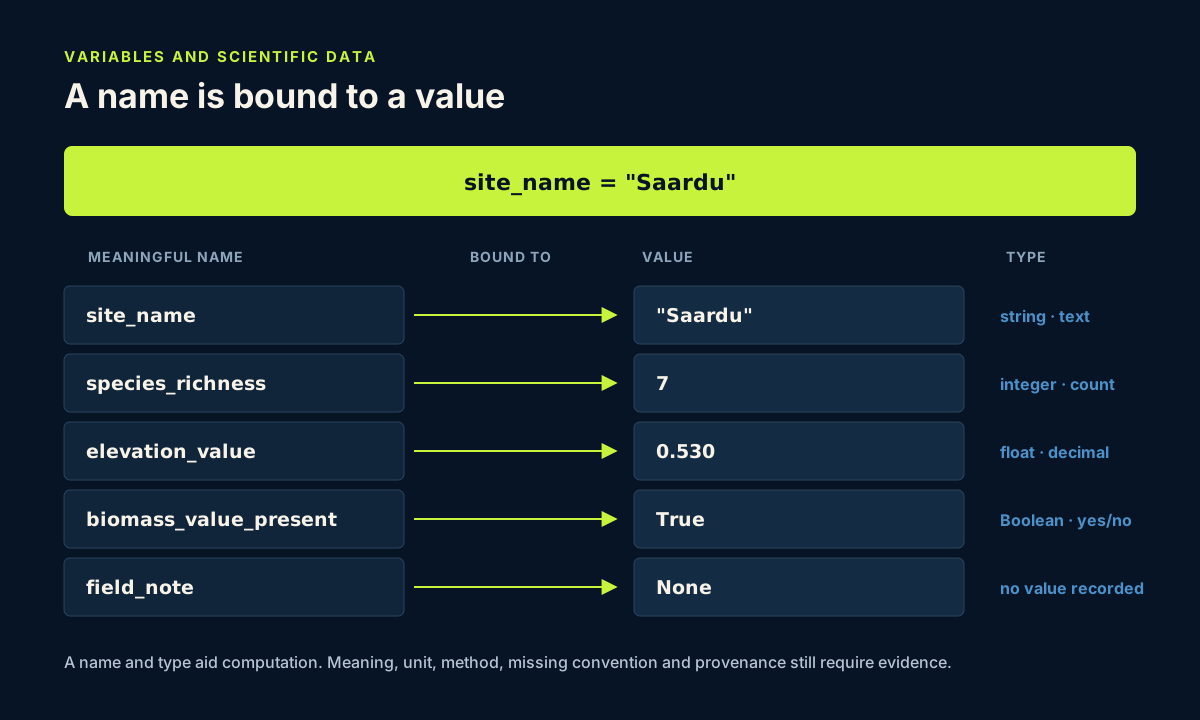
The diagram separates a variable name from the value it currently references. Neither part replaces scientific metadata.
The Boolean in the diagram is named biomass_value_present. It deliberately avoids claiming that a sampling event took place, because a table value alone cannot prove when or under which protocol something was sampled.
Scientific note Missing means “no value is recorded here”. Zero means “a value was recorded and its magnitude is zero”. Replacing missing observations with zero changes the scientific claim and can bias later summaries.
Learner action
Predict which of the five values can take part in arithmetic without conversion. Then run the cell and keep your prediction in Markdown above it.
3. Inspect types rather than guessing
type() asks Python what kind of value a name currently refers to. Add this cell beneath the practice observation:
print(type(plot_label))
print(type(species_count))
print(type(canopy_measurement))
print(type(measurement_checked))
print(type(biomass_measurement))
Predict before running
Write the expected type beside each variable. Then run the cell.
Expected output:
<class 'str'>
<class 'int'>
<class 'float'>
<class 'bool'>
<class 'NoneType'>
Code walkthrough
Each line works from the inside outward. Python first retrieves the value bound to the variable name. type(...) identifies the value's type. print(...) displays that result. The variable name itself is not inspected for scientific meaning.
The values "72" and 72 make the distinction visible:
reported_count = "72"
verified_count = 72
print(type(reported_count))
print(type(verified_count))
The first value is text; the second is a number. They look similar to a reader but behave differently in Python.
Learner action
Run the "72" and 72 example. Add a Markdown sentence describing one real data-import situation in which a count might arrive as text.
4. Use clear names and document units
Python variable names cannot contain spaces. A common scientific style is snake_case: lowercase words separated by underscores. Compare x with species_richness; the second name gives a reviewer more context.
Names still are not complete metadata. canopy_height_m would claim that a value measures canopy height in metres. Use that name only when the field definition and unit have been verified. If the unit is undocumented, a neutral name such as canopy_measurement plus a metadata note is more honest.
Good metadata may include:
- the documented field name;
- the unit;
- the measurement method;
- missing-value conventions;
- the source and version.
Build a one-value data contract
For every important value, a professional workflow should be able to answer:
| Question | Example for species_richness | What Python can verify |
|---|---|---|
| What does the name mean? | number of species recorded for one quadrat | only that the name exists |
| What is the stored type? | integer | type(species_richness) |
| What is the unit or counting convention? | count under a documented field protocol | not the protocol itself |
| How is missing represented? | not yet established for the published field | whether the current value is None |
| What values are plausible? | requires ecological and protocol evidence | a rule only after the scientist defines it |
| Where did it come from? | source table, record and version | only what the workflow records explicitly |
This small contract prevents a descriptive variable name from becoming false confidence. The Academy will later express the same questions as table schemas, raster metadata and model feature definitions.
Go deeper — names and metadata A descriptive name helps a human read code. Formal metadata connects the value to a definition that can be checked outside the code. Professional datasets need both.
Learner action
Rewrite the name x = 7 so it communicates that the value is a practice species count. Do not add a unit that has not been documented.
5. Convert only after checking meaning
Sometimes a numeric value arrives as text. Python can convert a valid numeric string:
reported_richness = "7"
species_richness = int(reported_richness)
print(species_richness)
print(type(species_richness))
This conversion is safe only after you have checked that "7" represents a count. int("unknown") fails because the text is not an integer. Converting "9999" to 9999 succeeds computationally, but it does not prove that 9,999 species were measured correctly.
Identifiers require special care. Converting a label such as "007" to the integer 7 removes leading zeros and can break joins to other records. Ask whether the value is a quantity or an identifier before converting it.
Type-error debugging exercise
Run this deliberately incorrect cell:
reported_richness = "7"
adjusted_richness = reported_richness + 2
Python reports a TypeError because it cannot add a string and an integer. Read the final error line and find the expression that combines incompatible types. Then convert the verified count before calculating:
reported_richness = "7"
adjusted_richness = int(reported_richness) + 2
print(adjusted_richness)
Learner action
Keep the corrected cell and add a Markdown note stating why conversion fixes the Python operation but does not validate the original measurement.
6. Apply basic types to one published plot
The published Baltic coastal plant traits table contains plot SALS1 at the Saardu site. Verified values already used in the Academy are SampleID SALS1, site Saardu, plantcommunity LS, Sp_richness 7 and Elevation 0.530. The accompanying public material used here does not supply a field-level unit dictionary, so the code preserves the published field names or uses a neutral name.
Worked example
plot_id = "SALS1"
site_name = "Saardu"
plant_community = "LS"
species_richness = 7
elevation_value = 0.530
biomass_value_present = True
field_note = None

print(plot_id, type(plot_id))
print(species_richness, type(species_richness))
print(elevation_value, type(elevation_value))
plot_id is a string because it identifies a sample. species_richness is an integer count. elevation_value is a float, but its neutral name avoids inventing a unit. biomass_value_present states only that this table row contains a biomass value; it does not represent the biomass magnitude. field_note = None says that no separate note is recorded.
Python may display 0.530 as 0.53 because both literals represent the same floating-point number. The source's trailing zero may still communicate reported precision or formatting. Preserve the original file and metadata rather than expecting a float's display to retain that information.
The Boolean name is deliberately limited to table-value presence. A value being present in the table is not evidence of how, when or under which protocol the biomass was sampled. Those claims require documented sampling metadata.
Learner action
Before running, predict the three displayed types. Run the cell, then explain why Python may display 0.530 as 0.53 without changing its numeric value.
7. Guided practice and independent challenge
Guided practice — missing is not zero
Create variables for the published plot SALS3 using SampleID SALS3, site Saardu, community code LS, species richness 5, biomass value presence False and a missing biomass value represented by None.
- Assign each value to a clear variable name.
- Predict the type of every value.
- Use
type()to inspect each one. - Add a Markdown sentence explaining why zero would make a different claim from
None. - Add one row to a Markdown data-contract table with name, value, Python type, scientific role, unit status, missing convention and source.
- Run Lesson 1 and Lesson 2 cells in order.
Independent vegetation-plot task
Represent published plot SALS2 using SampleID SALS2, site Saardu, plantcommunity code LS, Sp_richness 6 and CCI_CWM 96.5.
Use a neutral name such as cci_cwm_value until its definition and measurement convention are confirmed. Print every value and its type. Then write:
- one reason the sample identifier is text;
- one reason species richness is numeric;
- one statement explaining why changing a type cannot correct an invalid measurement.
Then test a realistic failure: create reported_plot_id = "007", convert it to an integer and compare the result with the original text. Explain why the successful conversion is unsuitable for an identifier.
Professional QA decision
Review every Lesson 2 variable and assign one status:
ready— type and scientific meaning are supported for the current task;review— the value can be preserved, but unit, convention or provenance needs confirmation;stop— conversion or interpretation would discard identity or invent metadata.
Record the reason beside each status. Do not change an uncertain value merely to make the code easier.
Scientific interpretation
These variables describe one quadrat record, not the Saardu site as a whole. The code preserves values and makes types visible. It does not establish what an undocumented unit is, expand the LS code or prove that a measurement is ecologically plausible.
Learner action
Complete the independent task without copying the worked cell. Use the submission checklist and upload your extended notebook, screenshot and written interpretation.
8. Reflection and portfolio artifact
Write short answers in your private notes:
- Why are
"72"and72different values? - When is
Nonescientifically preferable to zero? - What does
type()tell you, and what can it not tell you? - Why does
elevation_valuecommunicate less than a verified field definition and unit? - Why can a successful type conversion still leave an invalid measurement?
- Why can converting
"007"to7damage a scientific record even though Python succeeds?
Portfolio artifact
Artifact 02 — Scientific variables record
Your continuing notebook now represents ecological values explicitly, inspects their Python types and documents the limits of type information. Its data-contract table and ready/review/stop decision form the second checkpoint in Portfolio Project 1 — Vegetation Data Explorer. It preserves missingness, identity and source precision without inventing units or protocols.
Species Atlas connection
In the study evidence, species and site are identifiers, OP/LS/US/TG are categorical community labels, and cover is numeric. A numeric type does not establish a unit or protocol. Inspect those roles in the Study Data Guide.