Module 1 · Chapter 1 · Lesson
Collections for Ecological Information
Use lists for editable species observations and dictionaries for named plot fields, with brief supporting uses for tuples and sets.
Open this lesson in the Academy workspaceLearning pathway
You already know
Lesson 2 showed that one value needs a type, a scientific role, a missing-value convention and provenance. You also learned that successful Python conversion does not guarantee a scientifically defensible value.
In this lesson
You will organise related values without losing the relationships that matter: sequence, named meaning, fixed position and unique membership. Your collection choice will become an explicit design decision.
Why this comes now
Scientific tables, raster metadata and model outputs contain groups of related values. Before opening a complete dataset, you need to understand what each collection preserves and what it can discard.
You will use this later
Lesson 4 applies quality rules to record values. Lesson 5 repeats operations over collections. Lesson 8 compares your expected record fields with a real table schema, and Module 2 uses collections to represent bands, bounds, transforms and processing parameters.
1. From separate values to ecological records
Learning outcome
By the end of this lesson, you can create, index and update a species list; create a dictionary for one vegetation plot; access and update dictionary values; explain a coordinate-order tuple; and recognise when a set is useful for unique labels.
Prerequisite: Open the same Vegetation_Data_Explorer.ipynb and run Lessons 1–2 successfully.
Why this matters
One vegetation plot contains related information. A field note may contain several species names. A published table row connects field names such as SampleID, site and Sp_richness to values. Remote sensing work uses the same relationships for band names, acquisition metadata, quality labels and model outputs.
A collection is one Python value that organises several related values. In this lesson, lists and dictionaries do the main work. Tuples and sets appear only where their specific behaviour is useful.
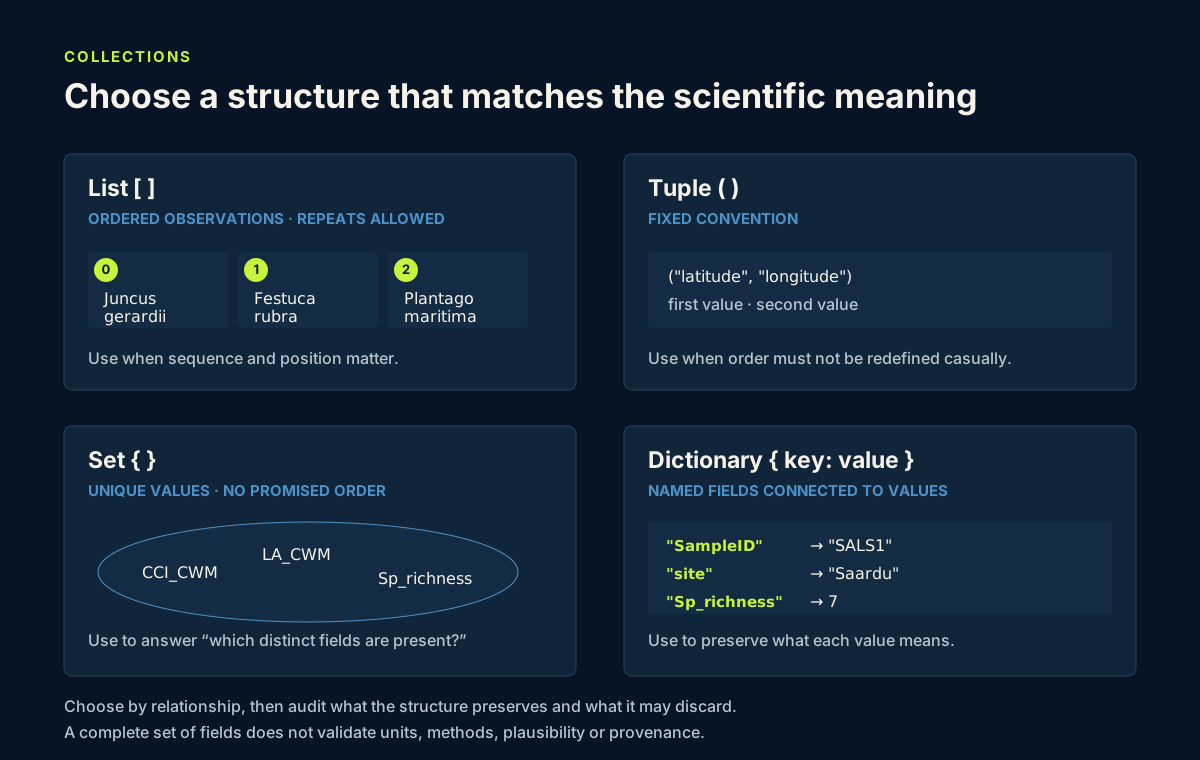
Use the diagram as a decision guide: editable sequence suggests a list; named fields suggest a dictionary; a small fixed convention suggests a tuple; unique membership suggests a set.
Make the relationship decision first
| Scientific relationship | Suitable collection | Preserves | Can discard or obscure |
|---|---|---|---|
| ordered observations that may be corrected | list | order, repeats and editable items | field meaning unless documented separately |
| named fields for one record | dictionary | key-to-value meaning | duplicate keys can overwrite an earlier value |
| a short, fixed positional convention | tuple | order and resistance to in-place change | meaning if position is not documented |
| distinct labels where order and repetition do not matter | set | unique membership | order and duplicate occurrences |
The shortest syntax is not the decision criterion. Start with the scientific relationship, then choose the collection whose behaviour protects it.
Scientific note The published Baltic coastal plant traits table reports plot-level fields but does not provide the species identities or plot coordinates used in today's small teaching examples. Instructional values are labelled as such and must not be presented as published observations.
Learner action
In Markdown, describe one ecological situation where the order of observations matters and one where named fields matter more than position.
2. Lists preserve an editable sequence
A list uses square brackets. It preserves order, can contain repeated values and can be changed. Python positions begin at zero, so index 0 retrieves the first item.
The following species names form a simplified instructional field note within the Baltic coastal meadow story. They are not species identities from the published trait table.
observed_species = [
    "Juncus gerardii",
    "Festuca rubra",
    "Plantago maritima",
]

print(observed_species[0])
print(observed_species[1])
Predict before running
Predict which name index 0 retrieves and which name index 1 retrieves. Run the cell and compare.
Code walkthrough
observed_species = [begins an ordered list.- Each quoted species name is one string item; commas separate items.
]closes the list.observed_species[0]retrieves the first item.observed_species[1]retrieves the second item.
Learner action
Add "Triglochin maritima" with observed_species.append("Triglochin maritima"). Then correct the second item with observed_species[1] = "Festuca rubra" and print the complete list. Explain why a list fits an editable field-note sequence.
Also print len(observed_species). len() reports how many list items are stored; it does not tell you how many distinct species exist or whether field effort was complete.
3. Dictionaries connect field names to values
A dictionary stores key: value pairs inside braces. A key is an exact label used to retrieve its value. This makes a dictionary a useful small model of one table row.
plot_record = {
    "SampleID": "SALS1",
    "site": "Saardu",
    "plantcommunity": "LS",
    "Sp_richness": 7,
}

print(plot_record["SampleID"])
print(plot_record["site"])
The dictionary uses values already verified from the published SALS1 row. It preserves the published key spelling without expanding the undocumented LS code.
Predict before running
Predict the two outputs. Would plot_record["Site"] work? Run the valid cell first. Python keys are case-sensitive, so "Site" and "site" are different strings.
Access and update
Retrieve species richness with:
print(plot_record["Sp_richness"])
To practise an update without changing the published record, create a separate instructional copy by typing the dictionary again as practice_plot. Then run:
practice_plot["reviewed"] = True
print(practice_plot["reviewed"])
The new reviewed key belongs only to your instructional record. It is not a field from the published table.
Dictionary keys must be unique. If the same key is written twice in one dictionary literal, Python retains only the later value. That behaviour can silently erase conflicting source values, so resolve duplicated fields during data intake rather than placing both under the same key.
Learner action
Create practice_plot, retrieve its site by key and add the instructional reviewed value. Add a Markdown note distinguishing the published keys from your notebook-only key.
4. Tuples and sets have supporting roles
Tuple: a small fixed order
A tuple uses parentheses and preserves order but cannot be changed in place. It can document a small convention that should remain stable:
coordinate_order = ("latitude", "longitude")
print(coordinate_order)
This tuple records only the order of two labels. It does not contain plot coordinates and does not claim that coordinates are supplied by the published table. A real coordinate record would also need a documented coordinate reference system.
The tuple being immutable does not make the convention scientifically correct. Coordinate order varies between contexts: many geospatial operations use horizontal x, y, often longitude then latitude for geographic coordinates. Record the convention explicitly and confirm the receiving software's expectation before passing coordinate values.
Set: unique membership without sequence
A set keeps unique values when order does not carry meaning:
requested_fields = {"SampleID", "site", "site", "Sp_richness"}
print(requested_fields)
The repeated "site" becomes one member. The printed order is not a scientific sequence. Use a list if observation order or duplicates matter.
A set can answer “which species labels occurred?”, but it cannot preserve repeated observations. Converting raw observations to a set too early may erase evidence about frequency or duplicate records.
Go deeper — why not use tuples and sets everywhere? Immutability and uniqueness are useful, but they add no benefit when you need an editable sequence or named fields. At this stage, choose them only when their specific behaviour communicates the relationship.
Learner action
Run both examples. Explain why the tuple is not a location and why the set is unsuitable for the order in which species were observed.
5. Common mistakes and recovery
Starting list positions at one
Why it happens: Everyday counting usually begins at one.
How to recognise it: observed_species[1] returns the second item. An index beyond the final item raises IndexError.
How to fix it: While learning, annotate positions explicitly: first → 0, second → 1, third → 2.
Misspelling a dictionary key
Why it happens: Human readers treat site and Site as nearly identical.
How to recognise it: Python reports KeyError even when a similar key is visible.
How to fix it: Copy the documented key exactly and compare capitalization and underscores.
Expecting a set to preserve order
Why it happens: A printed set appears in some order on screen.
How to recognise it: The order may differ while membership remains the same.
How to fix it: Use sets only for uniqueness or membership questions.
Inventing missing record fields
Why it happens: A realistic plot record feels incomplete without management or coordinates.
How to recognise it: A value cannot be traced to the dataset documentation or is based on a guess.
How to fix it: Omit the field or mark it explicitly as unavailable. Never make a record look complete by fabricating evidence.
Treating collection shape as scientific validation
Why it happens: A record with all expected keys looks complete and professional.
How to recognise it: Code confirms field names but no evidence supports units, methods, plausibility or provenance.
How to fix it: Separate a structure audit from a value audit. Passing the first only means that expected containers and labels are present.
Learner action
Deliberately request plot_record["Site"], read the KeyError, then correct only the capitalization and rerun.
6. Guided practice
Build two simple structures without nesting them.
- Create
indicator_speciesas an instructional list containing"Juncus gerardii"and"Festuca rubra". - Predict and print its first item.
- Append
"Plantago maritima"and print the updated list. - Create
practice_plotwith the published SALS2 valuesSampleIDSALS2, siteSaardu, community codeLSand species richness6. - Retrieve the site and richness by their exact dictionary keys.
- Add an instructional Boolean key named
reviewed_in_notebookand set it toTrue. - Explain in Markdown why the species list is instructional and which dictionary fields come from the published row.
- Add a Markdown provenance table with one row for each collection, its source and its scientific limitation.
Scientific interpretation
The list preserves an editable teaching sequence. The dictionary connects named fields to values for one plot. Neither structure proves that the values are complete, valid or representative of the wider site. Structure makes relationships explicit; scientific provenance determines what claims are defensible.
Learner action
Run the guided practice from top to bottom and check every retrieved value against the cell where it was created.
7. Independent plot-record task
Create one compact record for published plot SALS2.
Your work must include:
SampleID:SALS2;site:Saardu;plantcommunity:LS;- an instructional species list clearly labelled as not sourced from the published trait table;
- trait values containing the published
Sp_richnessvalue6andCCI_CWMvalue96.5; - no management label, because no verified management field is being taught here;
- no coordinates, because plot coordinates are not supplied in the published table used for these lessons.
You may use one shallow dictionary inside the plot record for the two trait values. Avoid deeper nesting.
plot_record = {
    "SampleID": "SALS2",
    "site": "Saardu",
    "plantcommunity": "LS",
    "species_practice": ["Juncus gerardii", "Festuca rubra"],
    "trait_values": {"Sp_richness": 6, "CCI_CWM": 96.5},
}
Add code that:
- retrieves the first practice species;
- retrieves
site; - retrieves
Sp_richness; - updates only the instructional species list;
- prints the updated list.
Then audit the record's outer structure:
required_fields = {"SampleID", "site", "plantcommunity", "species_practice", "trait_values"}
available_fields = set(plot_record)

missing_fields = required_fields - available_fields
unexpected_fields = available_fields - required_fields

print("Missing fields:", missing_fields)
print("Unexpected fields:", unexpected_fields)
print("Number of outer fields:", len(plot_record))
An empty missing_fields set is the expected structural result. It does not prove that a value is correct, that the record is complete for every scientific purpose or that the instructional species came from the published dataset.
Atlas provenance note: The instructional spelling
Juncus gerardiiabove is retained because it is part of this exercise, not silently treated as source data. The source-verified Atlas records are Juncus gerardi, Festuca rubra and Plantago maritima. Those links establish taxon-record provenance; they do not establish that the species occurred in this practice plot.
Professional QA decision
Classify the record as:
structure readyif the expected fields are present and the code retrieves them correctly;provenance reviewif any published and instructional values are not clearly separated;stopif a required identifier is missing or a collection choice has erased needed order, repetition or meaning.
Record the evidence for your decision. This handover note will be more useful than a screenshot of output without interpretation.
Write a concise explanation of why you used a list for species and dictionaries for named plot and trait fields. State the provenance limitation clearly.
Learner action
Complete the task independently, then use the submission checklist to upload the continuing notebook, one screenshot showing the structure audit and your collection-choice explanation with its QA decision.
8. Reflection and portfolio artifact
Write short answers in your private notes:
- Why does a species sequence fit a list?
- What meaning is protected by retrieving
plot_record["site"]rather than position1? - When is a tuple useful at this stage?
- When is a set useful, and what information does it discard?
- Which fields in your independent record are published and which are instructional?
- Why can an empty
missing_fieldsset coexist with unresolved scientific uncertainty?
Portfolio artifact
Artifact 03 — Vegetation plot record
Your Vegetation_Data_Explorer.ipynb now contains an editable species list, a named plot dictionary, precise access and update operations, a structural audit and a documented distinction between published and instructional values. This is the third checkpoint in Portfolio Project 1 — Vegetation Data Explorer and establishes the record design that later lessons will validate and analyse.
Ecological records
A plot record belongs to an entity hierarchy: site → vegetation community → 1 m² plot → species observations and measurements. Preserve SampleID, taxon label, cover and missingness as separate fields; a collection groups evidence but does not prove that its fields share a scale or unit. See the real campaign hierarchy.