Module 1 · Chapter 3 · Lesson
Open the Published Dataset with pandas
Load the complete Zenodo CSV through a reproducible project path and verify its structure before analysis. Practise with pandas, Pathlib, Zenodo dataset and.
Open this lesson in the Academy workspaceLearning pathway
You already know
Lessons 2–3 established value and record contracts. Lessons 5–7 added population accounting, executable checks and array structure. Until now, however, most values were copied into the notebook for controlled learning.
In this lesson
You will create a traceable boundary between an unchanged published file and an in-memory pandas table. You will record file identity and parsing choices, then test the loaded structure against documented expectations before analysis.
Why this comes now
Data-quality work is meaningful only when the input can be identified and reopened. A successful parser call is not enough: the wrong file or wrong schema can still produce a plausible DataFrame.
You will use this later
Lesson 9 profiles value quality, Lesson 10 defines analysis populations, Lesson 11 joins derived summaries and Lesson 12 assembles the handover. Module 2 applies the same immutable-input and intake-audit pattern to vectors, rasters and UAV products.
Why were these data collected?
This is not a generic CSV. It comes from a July 2024 field campaign in Boreal Baltic coastal wetlands and meadows in western Estonia. The campaign used 120 one-square-metre quadrats at Saardu, Keemu, Koera and Kudani to characterize coastal vegetation and provide ecological reference observations for UAV analysis.
Read each row through the entity hierarchy site → vegetation community → 1 m² plot → species and measurements. SampleID identifies the plot and must remain stable so a table row can later be linked to reviewed plot geometry, extracted raster predictors and one modelling row. Explore the species behind this dataset in the Species Atlas or open the Study Data Guide.
1. Open data as a documented scientific table
Learning outcome
By the end of this lesson, you will be able to place a published CSV in a reproducible project folder, load it into a pandas DataFrame, and verify its shape, field names, data types and first records before analysis. You will create the data-ingestion section of the Vegetation Data Explorer.
Prerequisites: Complete Lessons 1–7. You should understand files and folders, Python values and NumPy arrays. Allow 90–110 minutes, including dataset download.
Why this matters
Many scientific errors begin before a model or map is created: the wrong file is opened, a header becomes a data row, dates are misread, a numeric field is loaded as text, or a silently edited spreadsheet replaces the source. A professional analysis starts with an explicit path and a structural audit.
pandas is designed for labelled tables. It combines NumPy-based columns with row and column labels, missing-value handling, grouping, joining and reshaping. It does not understand ecological meaning automatically; the analyst must connect every field to metadata and sampling design.
Scientific context
You will now open the complete public CSV from Zenodo record 20083250. The record states that plant community traits were collected in July 2024 at four Baltic coastal wetland sites. The file is licensed CC BY 4.0 and contains 120 data rows and 25 fields.
Use the exact source filename:
Baltic_coastal_plant_traits2024.csv
Core idea: loading is a scientific operation only when the source, path, parsing choices and structural checks are visible and repeatable.
Learner action
Add ## Lesson 8 — Open the published dataset to your notebook. Create a Markdown provenance block containing the dataset title, creators as listed by Zenodo, DOI, download date, licence and unchanged filename.
Define the intake contract
| Intake element | Expected evidence | What it does not establish |
|---|---|---|
| source identity | Zenodo record, DOI, creators, licence and filename | that your local bytes are unchanged |
| local identity | file size and checksum recorded after download | measurement validity or semantic equivalence |
| parser contract | encoding, date field and day-first convention | that every inferred dtype is scientifically correct |
| structural contract | 120 rows, 25 fields and expected identifiers | that every value is valid or complete |
| immutability | raw CSV is read, never overwritten | that derived outputs are correct |
| handover decision | accept for quality audit, review or stop | permission to begin interpretation immediately |
2. Create a project structure without using a terminal
In the Jupyter file browser:
- Locate the folder containing
Vegetation_Data_Explorer.ipynb. - Create a folder named
databeside the notebook. - Open the Zenodo dataset record.
- Download
Baltic_coastal_plant_traits2024.csv. - Upload or move the unchanged CSV into the
datafolder. - Keep a separate backup of your notebook. Do not edit the source CSV in a spreadsheet.
Your minimum project should now be:
Vegetation_Data_Explorer/
├── Vegetation_Data_Explorer.ipynb
└── data/
    └── Baltic_coastal_plant_traits2024.csv
The relative path from the notebook to the dataset is data/Baltic_coastal_plant_traits2024.csv. A relative path makes the project easier to move than a machine-specific absolute path such as /Users/name/Downloads/....
After placing the file, record its byte identity without changing it:
from pathlib import Path
import hashlib

data_path = Path("data") / "Baltic_coastal_plant_traits2024.csv"
file_size = data_path.stat().st_size
file_sha256 = hashlib.sha256(data_path.read_bytes()).hexdigest()
print("Bytes:", file_size)
print("SHA-256:", file_sha256)
Keep this value in the provenance block. A matching checksum later proves byte-for-byte identity with your recorded local copy. It does not prove that two files with different metadata or formatting contain different scientific values, and it cannot validate the measurements.
3. Load once and verify immediately
Worked example
Predict the expected shape before running:
from pathlib import Path
import pandas as pd

data_path = Path("data") / "Baltic_coastal_plant_traits2024.csv"
meadows = pd.read_csv(
    data_path,
    encoding="utf-8-sig",
    parse_dates=["Date"],
    dayfirst=True,
)

print("Source exists:", data_path.exists())
print("Shape:", meadows.shape)
print(meadows[["SampleID", "site", "plantcommunity", "Sp_richness"]].head())
The shape should be (120, 25): 120 data rows and 25 columns. The first sample IDs should begin SALS1, SALS2, SALS3, SALS4, SALS5.
Code walkthrough
Pathrepresents a filesystem path without hard-coding operating-system separators.import pandas as pduses the standard pandas alias./joins the project folder and filename into one relative path.pd.read_csvparses the comma-separated file into aDataFramenamedmeadows.encoding="utf-8-sig"handles the file’s UTF-8 byte-order marker without attaching it to the first field name.parse_dates=["Date"]asks pandas to create date values rather than keep date characters as ordinary text.dayfirst=Truematches values such as01.07.2024..exists()verifies the path that the notebook used..shapereturns(rows, columns).- Double brackets select four named columns;
.head()displays the first five rows without altering the table.
Record pd.__version__ beside the parser choices. This is not a complete reproducible environment specification, but it gives a reviewer useful evidence if parsing behaviour differs later.
Make the structural expectations executable
required_fields = {"SampleID", "site", "plantcommunity", "Date", "Sp_richness", "AGB"}
expected_first_ids = ["SALS1", "SALS2", "SALS3", "SALS4", "SALS5"]

assert meadows.shape == (120, 25)
assert required_fields.issubset(meadows.columns)
assert meadows["SampleID"].head().tolist() == expected_first_ids
assert meadows["SampleID"].notna().all()
assert not meadows["SampleID"].duplicated().any()
If an assertion fails, stop before value analysis. Inspect the source, filename, parser arguments and unexpected structure; do not edit the expected values merely to make the cell pass.
4. Understand the DataFrame structure
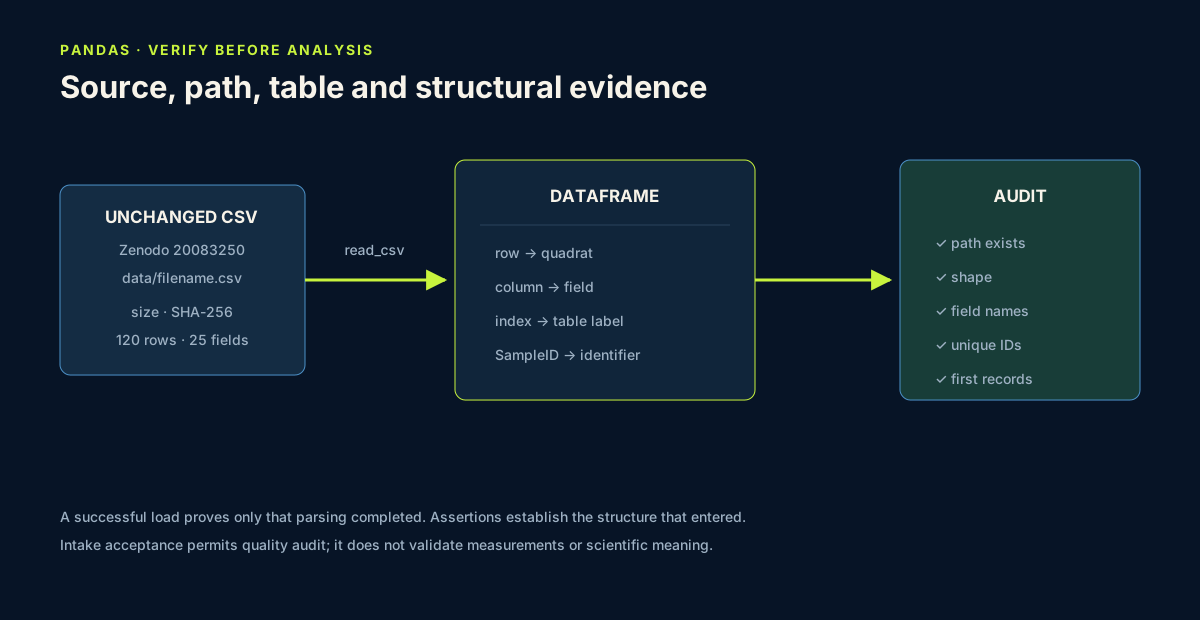
A DataFrame is a two-dimensional labelled table:
- each row represents one quadrat observation in this dataset;
- each column represents one recorded or derived field;
- the index is pandas’ row label and is not automatically a scientific identifier;
SampleIDis the dataset’s explicit sample identifier;- every column has a pandas dtype, which describes storage, not complete scientific meaning.
Inspect the schema:
print(meadows.columns.tolist())
print(meadows.dtypes)
meadows.info()
info() reports column names, non-null counts and dtypes. It is diagnostic output, not a replacement for a data dictionary. Fields such as Elevation, Distance, CCI_CWM, LA_CWM, Height_median, AGB and elemental ratios require source documentation before units or interpretations are asserted.
5. Verify identity, coverage and uniqueness
Run a compact structural audit:
print("Rows:", len(meadows))
print("Unique SampleID:", meadows["SampleID"].nunique())
print("Sites:", sorted(meadows["site"].unique()))
print("Communities:", sorted(meadows["plantcommunity"].unique()))
print("Duplicate IDs:", meadows["SampleID"].duplicated().sum())
You should find 120 unique sample IDs, four site labels and four community codes, with no duplicated SampleID values. These checks establish structural facts about the loaded file. They do not show that every measurement is correct or that every site–community combination was sampled equally.
Also print the minimum and maximum parsed date and the count of missing dates. A date column with the expected dtype can still contain missing or unexpectedly parsed values. Compare the result with the stated July 2024 collection context before continuing.
Scientific note: the table contains 40 Kudani rows and 30 each for Keemu and Koera, but 20 Saardu rows. Unequal row counts matter when interpreting pooled summaries.
6. Common mistakes and recovery
Loading a file from Downloads with an absolute path
Recognition: the notebook works only on one computer. Fix: keep the unchanged source inside the project data folder and use a relative path.
Editing the source CSV directly
Recognition: the downloaded checksum or row values no longer match the repository record. Fix: preserve the raw file; perform cleaning in code and write any derived table to a separate output file.
Trusting a successful load without checking shape
Recognition: the notebook proceeds even though a wrong delimiter produced one giant column or an extra header row. Fix: compare shape, columns and first identifiers with documented expectations.
Confusing pandas index with SampleID
Recognition: row number 0 is described as the sample identity. Fix: treat the index as a table position unless you deliberately assign a documented identifier.
Guessing units from a field name
Recognition: Elevation is labelled metres above sea level without source evidence. Fix: preserve the field name and numeric value, and mark the unit as requiring metadata confirmation.
Hiding parsing choices
Recognition: dates differ across computers or reruns. Fix: make encoding, date field and day-first convention explicit in read_csv.
7. Guided audit and independent challenge
Guided practice — first structural report
Create a Markdown heading ### Data ingestion audit. Under it, report:
- source path and existence result;
- shape;
- first and last
SampleID; - list of columns;
- unique site and community labels;
- duplicate
SampleIDcount; - date range;
- one field whose unit or definition needs confirmation.
Use code to produce each fact. Do not type a result manually if the notebook can calculate it.
Independent challenge — write a schema note
Choose six fields that will matter to the Vegetation Data Explorer: one identifier, two categorical descriptors and three numerical variables. Create a Markdown schema table with columns for exact field name, current pandas dtype, apparent role, missing-value count and interpretation caution.
Then select only those six columns into analysis_preview. Display the first eight rows and explain why selection does not change the source meadows table.
Professional intake decision
Classify the dataset as:
accepted for Lesson 9 quality auditwhen provenance, local identity, path, parser choices and all structural assertions are recorded and pass;reviewwhen the file loads but one expectation or metadata element is unresolved;stopwhen file identity, required fields, identifier completeness or identifier uniqueness differs unexpectedly.
An intake acceptance is permission to begin quality assessment, not a statement that the data are analysis-ready. Record the reason and unresolved field definitions in the notebook.
Scientific interpretation
At the end of this lesson, you have verified that a file with the expected structure has been loaded. You have not yet established measurement validity, handled missingness or selected an analysis population. Structural confidence is necessary, but it is only the first layer of data quality.
8. Reflection, submission and portfolio artifact
Answer in private notes:
- Why is the unchanged source file part of reproducibility?
- What does
(120, 25)establish, and what does it not establish? - Why is
SampleIDdifferent from the pandas index? - Which parsing choice would you report in a methods section?
- What does a matching file checksum establish, and what can it not validate?
Submission
- Notebook: provenance block, explicit loading code, structural audit, schema note and interpretation.
- Screenshot: the shape, selected preview and duplicate-ID result.
- Written answer: 220–300 words explaining how you verified source identity and structure and which metadata questions remain open.
Portfolio artifact
Artifact 08 — Reproducible dataset-ingestion report
This eighth checkpoint in Portfolio Project 1 — Vegetation Data Explorer demonstrates that you can bring a published table into Python without hiding its source, byte identity, location, parsing assumptions or unresolved metadata.