Module 1 · Chapter 2 · Lesson
Functions, Errors and Debugging
Turn scientific rules into tested reusable functions and diagnose failures from tracebacks and controlled evidence.
Open this lesson in the Academy workspaceLearning pathway
You already know
Lesson 4 specified and exercised one quality rule. Lesson 5 applied a stable method across a documented batch and kept population, inclusion and denominator evidence visible.
In this lesson
You will give a scientific rule a reusable boundary: named inputs, documented output, explicit missingness scope and no hidden dependence on notebook state. You will turn expected behaviour into repeatable tests and diagnose failures from evidence.
Why this comes now
Copied logic is difficult to update consistently. A function lets later lessons upgrade one method—such as missing-value detection—while tests show whether established behaviour has been preserved.
You will use this later
Lesson 9 deliberately upgrades the Lesson 6 missingness contract for pandas. Lesson 12 assembles the tested functions into the final explorer, and Module 2 depends on small testable functions for CRS, geometry, raster and UAV quality checks.
1. Package one scientific rule so it can be tested and reused
Learning outcome
By the end of this lesson, you will be able to define a small Python function with a parameter and return value, test it with known cases, and use an error message to locate and correct a fault. You will extend your portfolio notebook with a reusable vegetation quality-control function.
Prerequisites: Complete Lessons 1–5. You should understand variables, collections, conditions and loops. Allow 80–95 minutes.
Why this matters
Scientific code becomes difficult to trust when the same decision rule is copied across many notebook cells. One copy may be corrected while another remains outdated. A function gives a method a name, defines its inputs and produces a predictable output. The rule can then be tested once and reused consistently.
Errors are part of this process. A traceback records where Python could not continue; a scientifically wrong result may produce no error at all. Professional debugging therefore combines technical evidence, small controlled tests and scientific checks.
Scientific context
In Lesson 4 you classified biomass values as missing, invalid or recorded. In Lesson 5 you repeated operations across several plots. You will now package the biomass rule as one function and test it against cases whose correct status is known in advance.
Core idea: a function is a named, testable method that transforms an input into an output; debugging compares actual behaviour with explicitly expected behaviour.
Learner action
Add ## Lesson 6 — Functions and debugging. Write one sentence describing a scientific method you repeat and one input that method requires.
2. Follow the boundary of a function
def double_observation(value):
    result = value * 2
    return result

print(double_observation(7))
def begins a function definition. value is a parameter: a local name that receives the supplied input. return sends the result back to the calling code. Defining the function does not run its body; the call double_observation(7) does.
This function is computationally valid but scientifically vague. “Double” does not say whether the value is an area, concentration or count, nor why doubling is justified. Good scientific functions need a narrow purpose, a descriptive name and documented assumptions.
Write the function contract before its body
| Contract element | classify_biomass decision | Why a reviewer needs it |
|---|---|---|
| purpose | classify one AGB value structurally | prevents the result being mistaken for ecological validation |
| accepted input | None, ordinary int or float; Boolean rejected | states the Lesson 6 representation boundary |
| returned output | one status string | makes downstream use predictable |
| source mutation | none | preserves the original observation for audit |
| known limitation | NumPy/pandas missing values not yet handled | identifies the exact reason for the Lesson 9 upgrade |
| scientific assumption | a negative AGB value is structurally invalid for this exercise | separates a stated rule from a universal claim |
A docstring should summarise this contract near the code. The notebook's surrounding Markdown can preserve the fuller scientific provenance and limitation record.
3. Build a function from a rule you already understand
Worked example
Type the function and tests below, but predict all five statuses before running:
def classify_biomass(value):
    """Classify one AGB value using Lesson 6 value types."""
    if value is None:
        return "missing"
    if isinstance(value, bool):
        return "invalid Boolean"
    if not isinstance(value, (int, float)):
        return "invalid type"
    if value < 0:
        return "invalid negative"
    return "recorded"

test_values = [None, True, -1, "311.33", 311.33]
for test_value in test_values:
    print(repr(test_value), classify_biomass(test_value))
Expected output:
None missing
True invalid Boolean
-1 invalid negative
'311.33' invalid type
311.33 recorded
Code walkthrough
- The function name describes one narrow task.
- The triple-quoted sentence is a docstring. It records the function’s purpose for readers and software tools.
- Missingness is checked first so
Noneis never compared with zero. - The Boolean check must come before the general numeric check. In Python,
boolis a subclass ofint, soisinstance(True, (int, float))isTrueeven though a quality flag is not a biomass measurement. - The next
isinstancecheck accepts only the ordinary integer and floating-point representations introduced so far. - Each
returnends the current function call immediately. - A negative numeric value reaches the fourth rule.
- Any remaining numeric value receives
recorded; this means structurally acceptable, not scientifically proven. - The five test values deliberately cover one case for every branch.
reprmakes the quotation marks around the string visible, helping you distinguish text from a number.
Turn expectations into executable checks
Printed output helps a human inspect the cases. An assert statement makes an expectation executable:
assert classify_biomass(None) == "missing"
assert classify_biomass(True) == "invalid Boolean"
assert classify_biomass(-1) == "invalid negative"
assert classify_biomass("311.33") == "invalid type"
assert classify_biomass(311.33) == "recorded"
A passing assertion produces no output. A failed assertion raises AssertionError at the unmet expectation. Keep the readable test matrix and the assertions: one communicates the cases; the other prevents a changed function from silently contradicting them.
The function has a deliberate Lesson 6 boundary
At this point in the module, None is the missing-value representation you have learned to handle. The function is robust for that stated boundary, but it is not yet ready for a pandas column. In Lesson 7 you will meet NumPy's np.nan; in Lessons 8–9 you will see how pandas represents and detects missing table values. An unchanged Lesson 6 function could treat np.nan as an ordinary float and incorrectly return "recorded".
Do not hide this limitation or patch it with an unexplained special case. In Lesson 9 you will deliberately upgrade the function with pd.isna(). Scientific software evolves when real data introduce representations that the earlier specification did not yet cover.
4. Debug from evidence, not from random edits
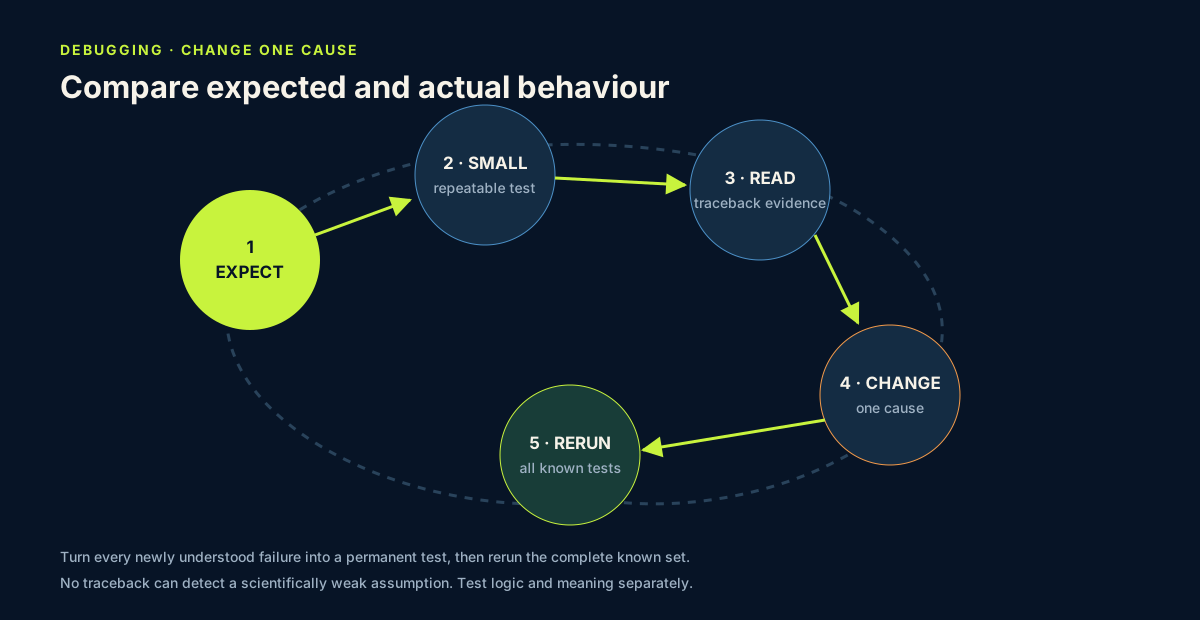
Use this five-step debugging method:
- State the expected behaviour. Write what should happen for a specific input.
- Make the failure small and repeatable. Run the shortest cell that still shows it.
- Read the traceback from the final line upward. The final line names the error type and message; the preceding lines show where the call travelled.
- Change one cause. Avoid replacing the entire cell before understanding the evidence.
- Rerun the known tests and then Run All. A fix for one case must not break another or depend on stale notebook state.
Rerunning every established test after a change is regression testing. It asks whether the correction preserved behaviour that already worked. It cannot reveal an important case that was never specified, so each new failure should become a new permanent test before the function is changed.
Common error categories provide clues:
SyntaxError: Python could not parse the written instruction;NameError: a name has not been defined in the current kernel state;TypeError: an operation received an incompatible type;KeyError: a dictionary or table label was not found;- unexpected output with no traceback: the code ran, but the logic or scientific assumption may be wrong.
5. Diagnose three failures deliberately
Do not paste invalid instructions into the permanent analysis. Instead, create a temporary code cell for each exercise, observe the message, record the diagnosis in Markdown and then correct or delete the cell.
Case A — wrong name
Call classify_biomass(biomass_value) before defining biomass_value. Expect NameError. Fix it by defining the intended input, not by renaming unrelated variables.
Case B — wrong type
Try adding 1 to the text value "311.33". Expect TypeError. Inspect the source before converting: a conversion is defensible only when the text truly represents a numeric measurement.
Case C — wrong key
Create plot = {"SampleID": "SALS1", "AGB": 311.33} and request plot["agb"]. Expect KeyError because field names are case-sensitive. Fix the key to match the documented schema.
For each case, capture the error type, the first relevant notebook line, the cause and the smallest correction.
6. Common mistakes and recovery
Printing inside every function instead of returning
Recognition: the result appears on screen but cannot be stored, combined or tested easily. Fix: return the scientific status; let the calling code decide how to display it.
Depending on a global notebook variable
Recognition: the function works only after an unrelated cell has run. Fix: pass required information through parameters and rerun from a clean kernel.
Catching every error without understanding it
Recognition: a broad try/except hides missing keys or invalid types and continues with an unreliable result. Fix: during this lesson, let unexpected errors remain visible. Add targeted exception handling only when the recovery policy is explicit.
Testing only the ordinary case
Recognition: the function works for 311.33 but fails for missing, negative or text inputs. Fix: test normal, boundary, missing and invalid cases.
Changing code until the traceback disappears
Recognition: execution succeeds but the scientific meaning changes. Fix: compare the final result with the written expectation and the source record, not only with the absence of an error.
7. Guided practice — richness review function
Write classify_richness(value, threshold) with this documented behaviour:
- return
"missing"forNone; - return
"invalid negative"for a negative number; - return
"review"when the value is below the supplied threshold; - otherwise return
"meets rule".
Use the instructional threshold 6. Test the function with None, -1, 5, 6 and 7. Before running, create a two-column Markdown table of expected inputs and outputs. Confirm that 6 follows the boundary rule you intended.
Then call the function in a loop for SALS1–SALS6. Keep the source values separate from the returned status.
8. Independent challenge, reflection and portfolio artifact
Write a function named summarise_plot(plot, richness_threshold) that accepts one plot dictionary and returns a new dictionary containing:
SampleID;richness_statusfrom your tested richness function;biomass_statusfromclassify_biomass.
Test it with one complete record, one missing-biomass record and one deliberately malformed practice record. For the malformed record, state whether a missing required key should raise KeyError or return a documented status; do not hide it with a broad exception. Do not mutate the input dictionary. Make a shallow copy before the call and verify afterward that the source still equals that copy. Record the expected and actual outputs, and document one bug you found or one test that increased your confidence.
Professional QA decision
Classify the function set as:
ready for the current notebookwhen the contract, branch tests, assertions, non-mutation check and clean Run All pass;reviewwhen expected and actual behaviour differ or a failure policy is ambiguous;not ready for pandas datauntil Lesson 9 adds and tests pandas-aware missingness.
Record both the tested software boundary and the remaining scientific-validation question. “All tests passed” is useful evidence only when readers can see what the tests covered.
Scientific interpretation
A passing function test shows that the code behaves as specified for the tested cases. It does not prove that the specification is ecologically correct or complete. Scientific validation asks whether the rule, input data and interpretation are appropriate for the research purpose.
Answer in your private notes:
- What information belongs in a parameter rather than a hidden notebook variable?
- Why does
returnmake a function easier to test thanprintalone? - Which test protects the missing-versus-zero distinction?
- What can a successful test not establish scientifically?
- Why should a newly discovered failure become a test before you change the function?
Submission
- Notebook: tested biomass and richness functions, three diagnosed errors, and the independent
summarise_plotchallenge. - Screenshot: test inputs and actual outputs for the independent function.
- Written answer: 200–280 words describing your debugging evidence, why the fix was appropriate, and the limits of the tests.
Portfolio artifact
Artifact 06 — Tested ecological quality-control functions
This sixth checkpoint in Portfolio Project 1 — Vegetation Data Explorer demonstrates that you can make a scientific rule reusable, expose assumptions at the function boundary, protect source records and debug from controlled evidence.
Where this goes next
A validation function can check cover range, preserve missing traits and flag insufficient trait replication before a species median enters a community-weighted mean. Keep the rule, evidence and action separate. Follow the complete field-to-EO lineage.