Module 1 · Chapter 2 · Lesson
Conditions and Data-Quality Rules
Translate transparent scientific criteria into auditable Python decisions while preserving missing values and source measurements.
Open this lesson in the Academy workspaceLearning pathway
You already know
Lesson 2 established honest values and unresolved metadata. Lesson 3 organised those values into an auditable plot record and separated structural completeness from scientific validity.
In this lesson
You will turn one documented question into an explicit decision path. You will define its input scope, boundary, missing-value treatment, derived status and review action before trusting the code.
Why this comes now
A record must exist before it can be checked. Conditions are the bridge between stored evidence and a reproducible quality-control decision; they prepare you to apply one rule repeatedly in Lesson 5 and package it as a tested function in Lesson 6.
You will use this later
Lesson 9 applies field-specific pandas rules to the full table. Module 2 uses the same logic for CRS compatibility, geometry validity, raster NoData, alignment and UAV product acceptance.
1. Turn scientific criteria into visible decisions
Learning outcome
By the end of this lesson, you will be able to write and explain an if–elif–else decision that checks one vegetation record against documented data-quality criteria. You will distinguish a computational rule from a scientific conclusion and extend Vegetation_Data_Explorer.ipynb with a transparent quality-control section.
Prerequisites: Complete Lessons 1–3. You should be able to run notebook cells, create basic values, and retrieve values from a dictionary. Allow 75–90 minutes.
Why this matters
Remote sensing workflows make decisions constantly: reject a cloud-contaminated scene, flag a reflectance value outside an expected range, separate missing biomass from measured zero biomass, or decide whether a field plot has enough information for comparison. Hidden decisions are difficult to review. Explicit conditions make the reasoning inspectable.
A condition does not make a rule scientifically valid. The scientist must justify the threshold, confirm the unit, consider measurement uncertainty and explain what happens at the boundary. Python contributes consistency: once the rule is defined, every record is checked in the same way.
Scientific context
The published Baltic coastal plant traits table contains 120 quadrats. Plot SALS3 has Sp_richness 5 and Moisture_mean 17.03, while its above-ground biomass field AGB is empty. Today you will represent that empty cell as None in a small dictionary. You are not yet loading the CSV; direct table work begins in Lesson 8.
Core idea: a condition asks a precise question whose answer is
TrueorFalse, then makes the next instruction depend on that answer.
Learner action
Add a Markdown heading ## Lesson 4 — Conditions and data-quality rules. Beneath it, write one data-quality decision you have made in ecological, GIS or laboratory work and identify the evidence used to make it.
2. A comparison produces a Boolean answer
Python comparison operators turn two values into True or False:
==means “is equal to”;!=means “is not equal to”;<and>mean “less than” and “greater than”;<=and>=include the boundary value;is Nonechecks whether a value is explicitly missing in today’s small record.
For example, 5 < 6 is True. Python can evaluate that relationship, but it cannot decide whether 6 is an ecologically defensible threshold. Record the origin and purpose of every threshold near the code that uses it.
species_richness = 5
review_threshold = 6

print(species_richness < review_threshold)
print(species_richness == review_threshold)
print(species_richness >= review_threshold)
Predict before running
Predict the three Boolean outputs before running the cell. Pay particular attention to the boundary: if richness were exactly 6, which comparison would include it?
Code walkthrough
species_richness = 5stores the publishedSp_richnessvalue forSALS3.review_threshold = 6names an instructional threshold. It is not supplied by the dataset authors.<asks whether 5 is below 6.==compares values. It does not assign a new value.>=asks whether the value is at least the threshold, including equality.
3. Branch only after the question is explicit
An if statement runs an indented block only when its condition is True. elif checks another condition if earlier ones were false. else handles every remaining case. The order matters because Python takes the first matching branch and then leaves the decision structure.
Worked example
Type this complete example into one new code cell, but do not run it yet:
plot = {
    "SampleID": "SALS3",
    "Sp_richness": 5,
    "Moisture_mean": 17.03,
    "AGB": None,
}
review_threshold = 6

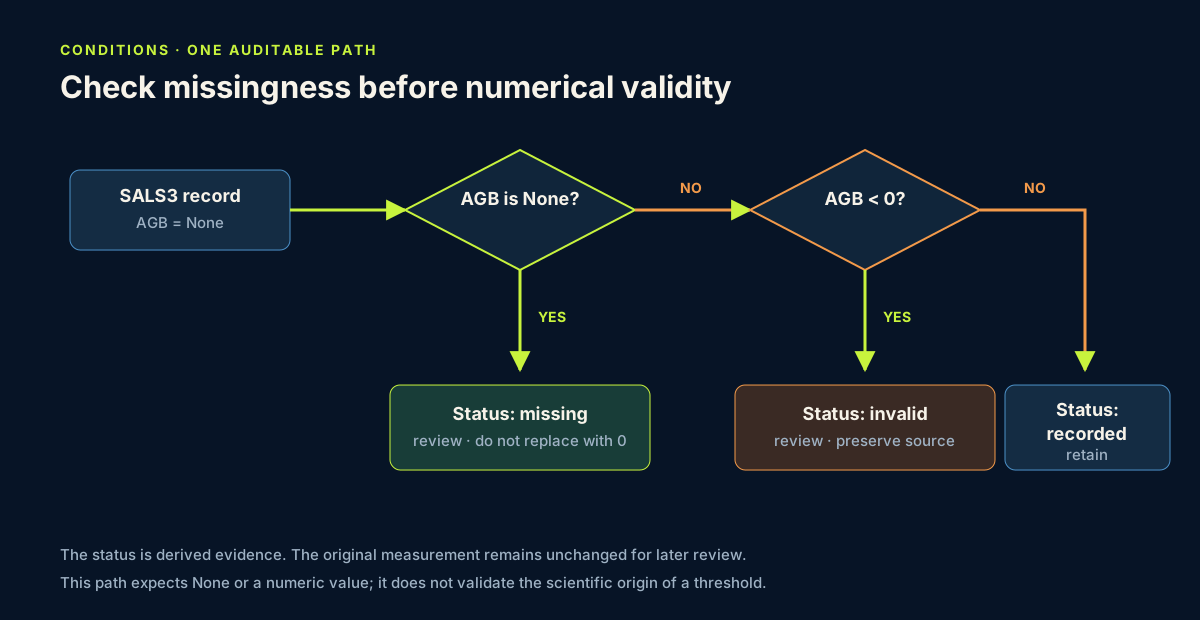
if plot["AGB"] is None:
    biomass_status = "missing — do not treat as zero"
elif plot["AGB"] < 0:
    biomass_status = "invalid negative value"
else:
    biomass_status = "recorded"

richness_status = "review" if plot["Sp_richness"] < review_threshold else "meets rule"
print(plot["SampleID"], biomass_status, richness_status)
Predict before running
Write the expected biomass_status and richness_status in a Markdown cell. Which branch will Python enter first? Why will it never compare None < 0?
The expected output is:
SALS3 missing — do not treat as zero review
Code walkthrough
plotrepresents one published row using the dictionary structure learned in Lesson 3.Nonerecords that the CSV cell is empty; it does not claim that biomass was zero.if plot["AGB"] is None:asks the missingness question first.- The four spaces before
biomass_statusmark the instruction that belongs to that branch. elifwould test a negative value only if biomass were present.elseaccepts the remaining present, non-negative values as recorded; it does not prove they are accurate.- The final line before
printuses a compact conditional expression. Read it as: choose"review"when the comparison is true, otherwise choose"meets rule". - The output reports the rule result without changing the source values.
4. Design rules that preserve scientific meaning
A professional quality rule has five visible parts:
- Field: which variable is being checked?
- Criterion: what exact comparison is made?
- Provenance: where did the criterion come from?
- Action: flag, exclude, correct or retain?
- Audit message: what should another scientist be able to read afterward?
Before writing a real rule, complete a specification like this:
| Rule element | Instructional richness example | Scientific question it exposes |
|---|---|---|
| input field and representation | Sp_richness, integer or None | is the input contract supported by the source? |
| criterion and boundary | review when value is below 6 | is 6 included, and why was 6 chosen? |
| missing-value path | review separately | must absence be distinguished from a low count? |
| provenance | Academy programming exercise | is the criterion sourced or merely instructional? |
| derived action | review; retain source value | what happens after the flag? |
| validation cases | missing, 5, 6 and 7 | do all branches and boundaries behave as intended? |
The rule is not ready for scientific deployment when its provenance is only “programming exercise.” It is suitable for learning how to make the decision process inspectable.
Check missingness before numerical range rules. A missing value cannot safely take part in ordinary arithmetic or comparisons. Keep the original measurement unchanged and store the review result separately. This preserves an audit trail.
State the input contract too. The worked biomass rule expects only None or a numeric value. A Boolean or numeric-looking string is outside that contract even if Python happens to compare it. Lesson 6 will make type rejection explicit, and Lesson 9 will upgrade missingness for pandas data.
Scientific note: “flagged” does not mean “wrong.” A value may be unusual because the ecosystem is unusual. Quality control identifies records that need evidence-based review; it should not erase ecological variation automatically.
5. Common mistakes and recovery
Using = when you mean ==
Why it happens: both symbols are read as “equals” in everyday language. Recognition: Python reports a syntax error inside the condition. Fix: use = to assign a value and == to compare two values.
Treating missing as false or zero
Why it happens: an empty cell looks like an absence of quantity. Recognition: missing biomass silently becomes 0, changing means and maps. Fix: represent missingness explicitly and ask is None before numerical comparisons.
Forgetting indentation
Why it happens: indentation may look decorative to a beginner. Recognition: Python reports IndentationError, or an instruction runs outside the intended branch. Fix: use four spaces consistently and align instructions belonging to the same branch.
Writing an unexplained threshold
Why it happens: a round number feels self-explanatory. Recognition: another scientist cannot tell whether the rule came from a protocol, sensor specification or convenience. Fix: name the threshold, state that today’s value is instructional, and cite a protocol when a real decision is introduced.
Removing a flagged observation immediately
Why it happens: cleaning is confused with deletion. Recognition: the notebook cannot reconstruct which rows were removed or why. Fix: create a status or flag first, inspect the record, and document any later exclusion separately.
6. Guided practice — check a complete record
Create a dictionary for SALS4 using the published values Sp_richness 7, Moisture_mean 24.53 and AGB 284.78.
- Predict the result of the missingness branch.
- Reuse the
review_thresholdvalue of 6 and classify richness. - Add a moisture review rule with the explicitly instructional interval 0–30.
- Print the sample ID and all three statuses.
- Add a Markdown note stating that the moisture interval is a programming exercise, not a validated ecological acceptance range.
- Change only
AGBtoNone, rerun, and explain which output changes and why.
Boundary and branch stress test
Test the biomass path four times by changing only AGB: None, -0.01, 0 and 284.78. Before each run, record the predicted branch, status and action in a Markdown table. Then compare prediction with output.
Test the instructional richness rule with 5, 6 and 7. This is a boundary test: it verifies whether the code implements “below 6” exactly. It does not validate 6 as an ecological threshold. Species richness is a count, but uncertainty can still enter through survey effort, detectability, taxonomy and recording.
Your evidence is complete only when every branch is exercised and the value exactly at the boundary behaves as specified.
Restart the kernel and run all notebook cells in order. A clean run should preserve Lessons 1–3 and add the decision results without overwriting the original plot values.
7. Independent challenge — write an auditable rule
Use published plot SALS5: Sp_richness is 7, Moisture_mean is 25.87 and AGB is missing.
Create one decision structure that assigns exactly one biomass status: missing, invalid or recorded. Create a second decision for species richness using a threshold you name clearly as instructional. Then produce a short audit message containing the plot ID, the checked field, the status and the action review or retain.
Do not delete or replace the source values. Before running, predict each branch. After running, explain why a missing biomass measurement cannot support a claim about low biomass.
Professional QA decision
Submit a compact rule record containing the input contract, threshold provenance, inclusive or exclusive boundary, test cases, observed results and remaining scientific limitation. Classify the rule as:
ready for instructional usewhen every documented branch and boundary behaves as specified;reviewwhen code behaviour is unclear or a case is untested;stop for scientific deploymentwhile criterion provenance or input assumptions remain unsupported.
The same rule can be computationally ready for teaching and scientifically unready for operational filtering. Record both judgements rather than collapsing them into one label.
Scientific interpretation
Your code can establish that a cell is empty and consistently label it for review. It cannot establish why the measurement is absent. Possible explanations include sampling design, field conditions, laboratory processing or data entry. Those explanations require metadata or contact with the data producers.
8. Reflection, submission and portfolio artifact
Answer in your private notes:
- Why should missingness be checked before a numerical range?
- What is the difference between a data-quality flag and proof of an error?
- How can branch order change the assigned status?
- What evidence would justify a real threshold for a remote-sensing reflectance value?
- Why is testing the value exactly at a threshold different from just testing one value on either side?
Submission
- Notebook: the same
Vegetation_Data_Explorer.ipynbwith the worked example, SALS4 guided practice, SALS5 challenge, predictions and audit messages. - Screenshot: the independent challenge and its visible output.
- Written answer: 180–250 words explaining how your rule preserves missingness, what its threshold can and cannot claim, and how another scientist could audit the decision.
Portfolio artifact
Artifact 04 — Transparent data-quality rules
This fourth checkpoint in Portfolio Project 1 — Vegetation Data Explorer demonstrates that you can translate a documented criterion into reproducible code, exercise every decision path and separate computational readiness from scientific deployment. Continue in the same notebook in Lesson 5.
From the Field — validation boundaries
Invalid cover, missing trait data and fewer than five trait measurements are different conditions and require different actions. Missing trait is not zero, and the ≥5 rule is a documented minimum for the pooled species method rather than a universal ecological threshold. See the CWM decision chain.